Current capability
Personal and project views, Calendar, shared Jupiter chat, Artist Tools discovery and nine specialist agents.
XO3D ONE connects creative studio decisions with the work that delivers each project. Studio brings together personal dashboards, production boards and timelines, delivery parts, files and review, Calendar, Jupiter and eight internal Artist Tools. Nine specialist agents have named responsibilities and inspectable work. This case explores the workflows in depth and distinguishes working capabilities, controlled pilots and features still in development.
Read the result, source and limits together.
Personal and project views, Calendar, shared Jupiter chat, Artist Tools discovery and nine specialist agents.
Current genuine interfaces with demo records, source-backed workflow descriptions and separately described installed local-tool proof.
Founder, creative director and system designer: product direction, role-shaped information design and operating model. Studio delivery remains collaborative.
Working local betas, calibration, testing and development are separate states. Account access, artist acceptance and live service availability are not inferred from screenshots.
Explore Studio, Calendar, Jupiter and Artist Tools
Planning, delivery, review, absence, specialist assistance and tool selection should connect through the project and the responsible person. The useful interface lets a user move from a summary into the record, output or proposed next step that supports it.
A direct account of the operating constraint, the product decision and the limits of the evidence.
A founder, producer and artist make different decisions from the same work. Management needs capacity, commercial context and exceptions. Production needs the brief, delivery date, assigned work and review state. A universal dashboard either exposes too much or hides the detail needed to act.
XO3D ONE starts with controlled project information and builds views around those responsibilities. Its agent layer follows the same principle: a named specialist owns a defined job, while routines, tasks and conversations make the work visible. The interface keeps a recommendation separate from the evidence and authority needed to act on it.
The latest production workflow also brings local video processing and beta whitebox rendering into the studio workspace. These are specific tools with visible limits. The system does not assume that every agent is healthy, every action is permitted or every production feature is ready for unrestricted use.
| Main areas | Management, Studio and Intel in one XO3D ONE application. |
|---|---|
| Studio workspace | My Dashboard, Production, Artist Tools, Calendar and Jupiter, subject to account access. |
| Delivery model | Owners, assigned teams, stages, dates, delivery parts, blockers and exact-project navigation. |
| Tool catalogue | 41 registered Labs utilities and guides, plus eight internal entries with separate maturity states. |
| Agent team | Nine named specialists with Job, Routines, Tasks, reports and conversations. |
| Public evidence | The genuine current interface with fictional projects and records labelled Demo data. |
Follow the work through its tools, people, evidence and decisions.
Leadership uses a different view from the production team. Management organises the day around Run the day, Money and demand, Delivery and people, System, Agents and Jupiter.
The purpose is to bring priorities, commercial context, delivery exceptions and operating checks into one place. The nine-agent team provides a named route into the responsibility behind a recommendation, rather than leaving leadership with a single dashboard score.
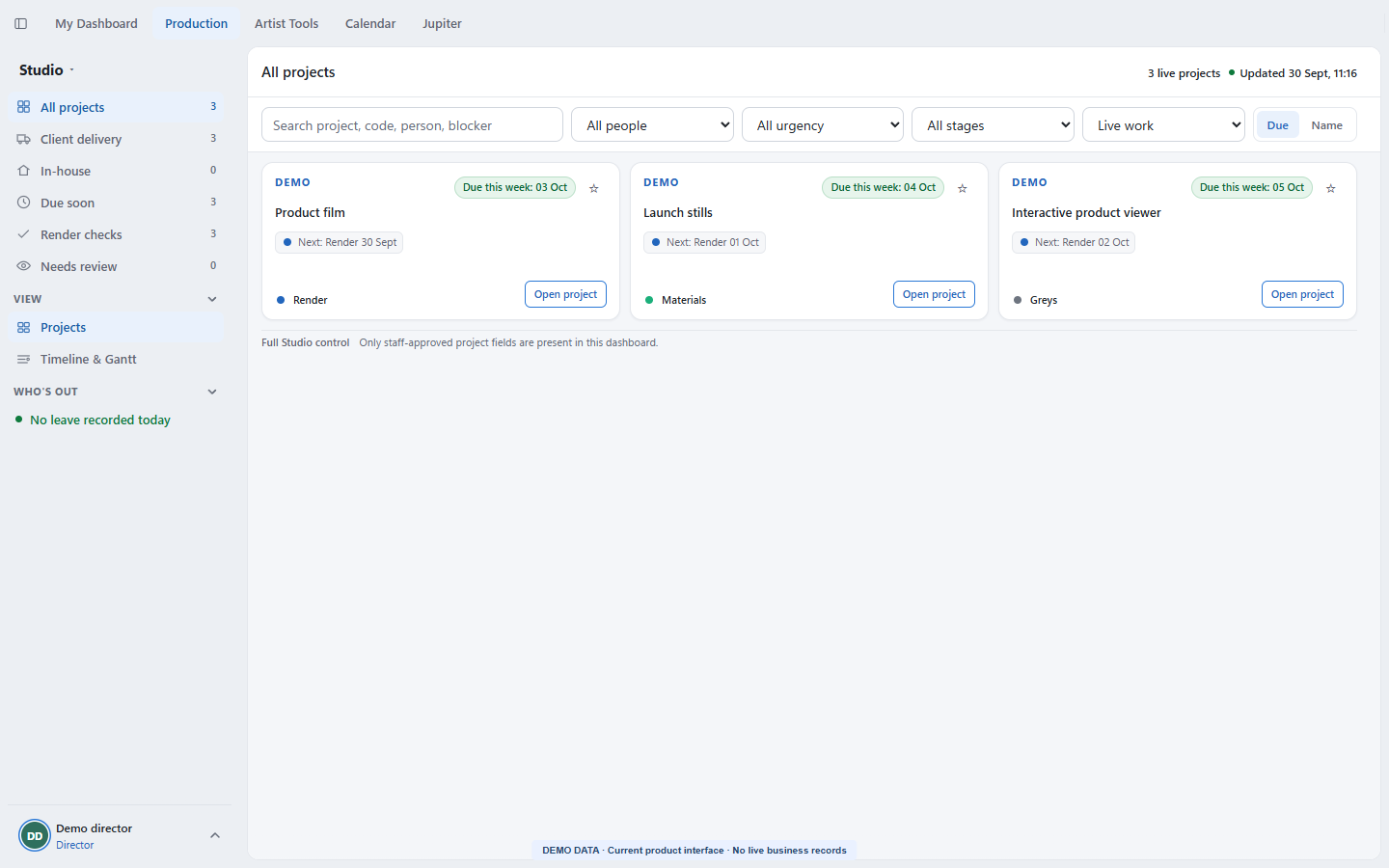
Production combines project boards, planning timelines and a detailed project workspace. Users filter by person and project type, follow the current stage, and open the exact project from a card or their own dashboard.
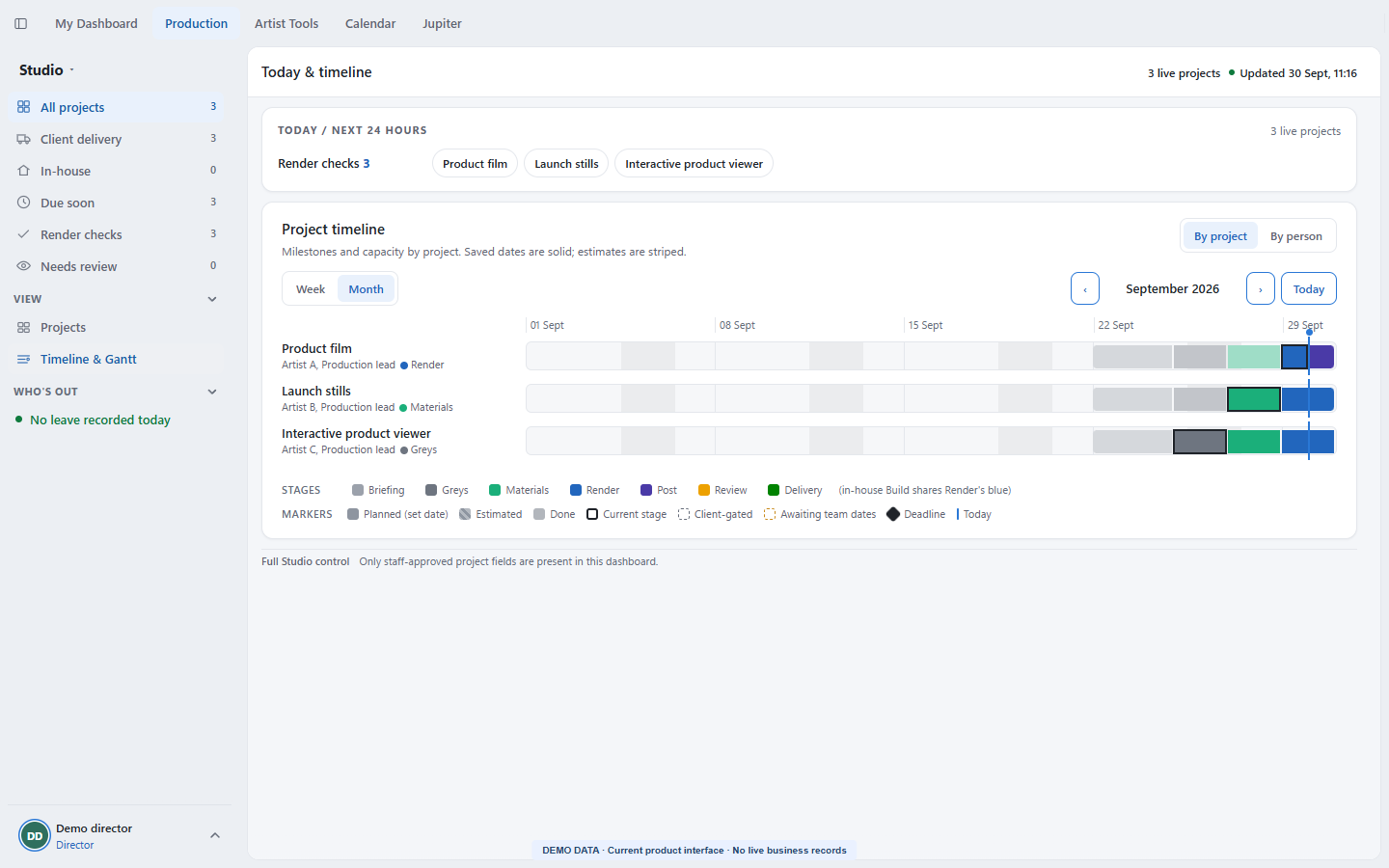
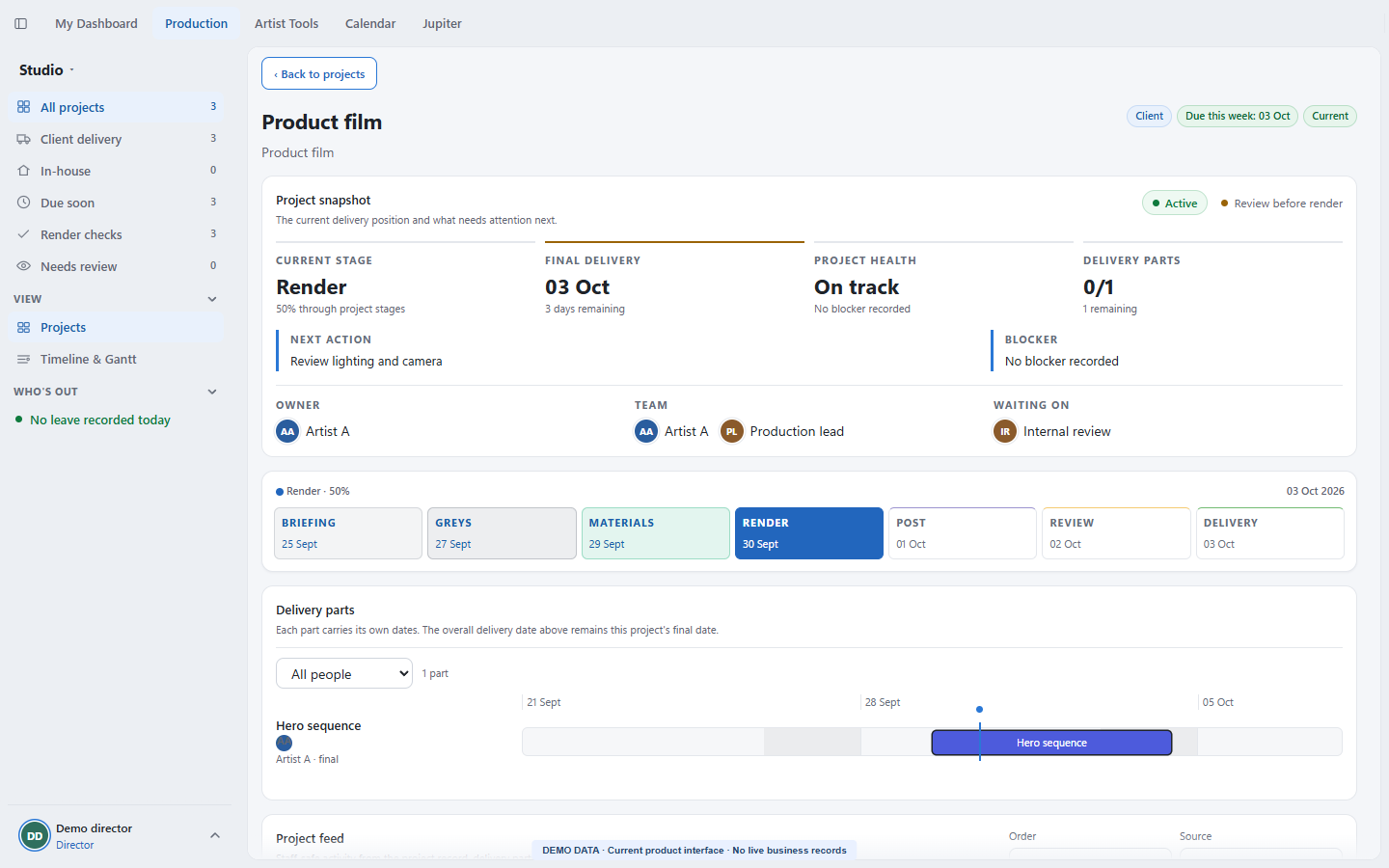
Project detail brings together the owner, assigned team, final delivery, health, next action and blocker. The seven client stages are Briefing, Greys, Materials, Render, Post, Review and Delivery. In-house work has its own stage sequence.
Stage dates and delivery parts are separate. A part has its own owner, start, due date, confirmed or estimated dates and completion state. One part can represent the final delivery, so a project deadline does not have to stand in for every handoff.
My Dashboard brings Overview, Needs attention, My projects, Agents, Time blocking, Coming up, Email triage and Waiting on others into a person-specific workspace.
Project cards open the exact assigned project. Agent suggestions and upcoming work sit alongside the dependencies that prevent progress, so a person can move from a summary into the record behind it.
Time blocking proposes a plan rather than silently changing a calendar. Email and personal-calendar cards report missing access honestly. A production-lead email assistant has a verified draft-only projection; that does not mean every staff mailbox is connected.
Production includes a Files and review workspace for browsing project files, versions, folder policy and connection state. Internal review and client feedback have different lanes.
The implemented review workflow supports still-image and paused-frame video markup, threaded replies, blocking notes, resolution and reopening against an exact version. Opening an older version for inspection does not change which version is selected.
Client feedback belongs to a deliberately published file version. Private team notes are not part of that client view. The separate Review product remains in development, with live client activation and production acceptance still to prove.
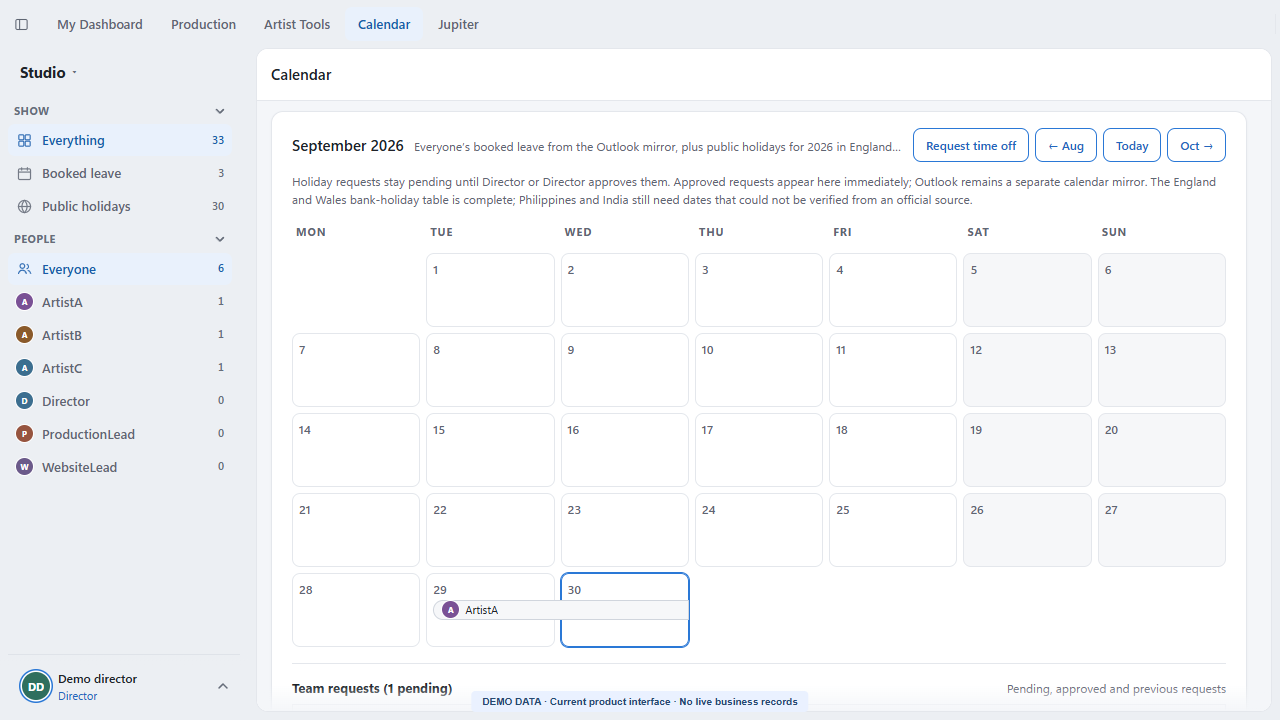
The shared Calendar shows recorded leave and public holidays in a month view, with filters for person and entry type. Multi-day leave appears as a continuous bar across the relevant dates.
Request time off collects the first and last day, leave type and an optional note. Staff see their own requests; authorised reviewers see the review queue. Pending, approved, rejected and cancelled states remain distinct, and a person cannot approve their own request.
Approved Studio requests feed Who's out and the production leave projection. That makes an approved absence visible beside delivery planning. The absence view is not a full Outlook replacement, and an empty result does not establish that everyone is available.
Jupiter is the conversational entry point into permitted company context. Saved chats, pinned conversations and visible history let users return to an ongoing question rather than starting again from a dashboard screenshot.
A weekly-delivery question can use the current production schedule directly: dated milestones, final deliveries, assigned people, blockers and conflicting dates. The deterministic schedule answer is separate from a general model response.
Jupiter can prepare a holiday-request card, find an Artist Tool and show the button that opens it, or guide authorised founders through new-project intake and explicit approval. Preparing a card is a different step from submitting a request or creating a job.
The interface also supports editable email-draft cards, account-dependent staging, answer receipts and feedback. Chat access and tool access remain tied to the user's permitted role; Jupiter is a controlled pilot rather than an unrestricted assistant for every account.
Artist Tools combines searchable categories, favourites and an Internal apps lane. The current catalogue defines 41 Labs utilities and guides, covering image preparation, textures, lighting, modelling, colour, planning, delivery and viewers.
Examples include Image Compressor, Image Resizer, Normal Map Creator, Texture Resolution Calculator, PBR Material Checklist, Depth of Field Calculator and GLB Viewer. Guides and calculators are distinct from tools that process files.
Eight internal entries describe more specialised production work. Their cards explain what they do, how to open them, what they require and what remains unfinished. The following tools deliberately have different maturity levels.
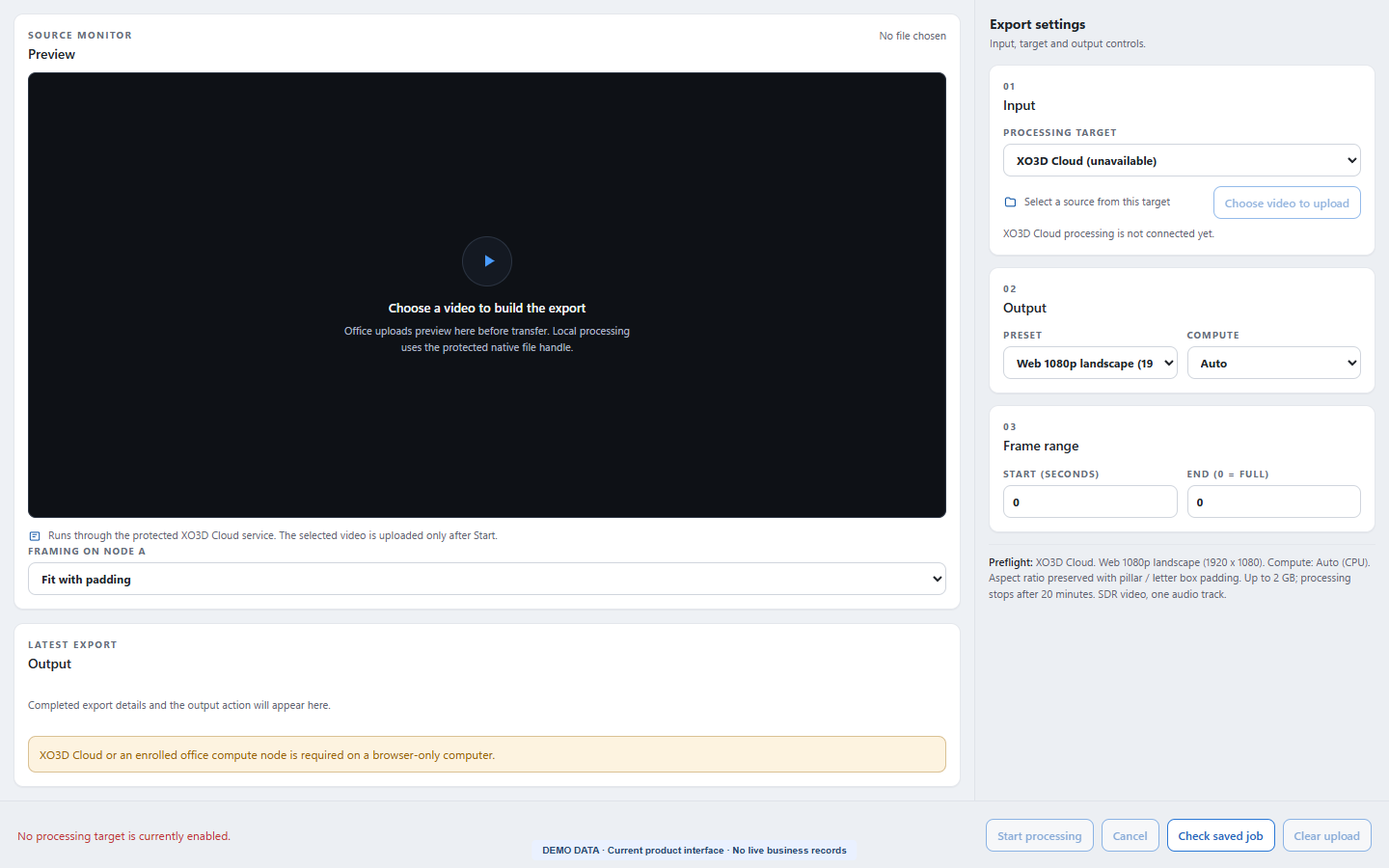
Video Processing uses a source monitor, trim track, grouped output settings, latest-export panel and persistent processing bar. It provides three fixed MP4 presets: 1080p landscape, square and vertical.
Preflight explains aspect-ratio padding before processing. Optional start and end values are checked against the source duration. Progress, cancellation and output reveal belong to the installed local workflow.
Local processing can be enabled or disabled per device. A real encode has been verified in the installed application; cloud and office targets remain unavailable until their services are connected.
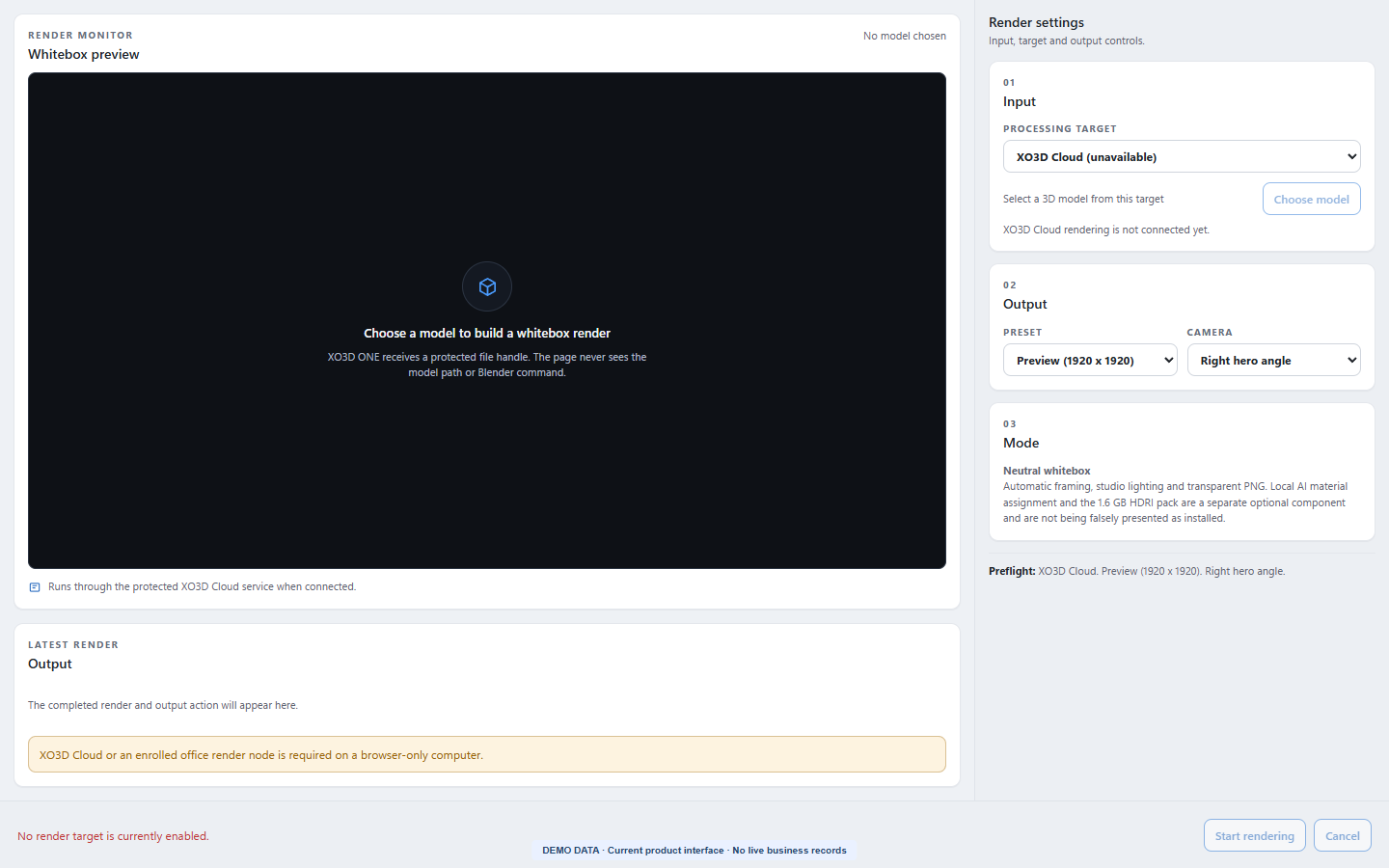
The local Whitebox Rendering beta accepts common mesh formats, automatically frames the model, applies neutral white material and controlled studio lighting, then renders a transparent PNG.
Users choose a fixed hero, front or left camera and a 1920-square preview or 4096-square output. The local renderer is installed and enabled deliberately on each device; output checks cover PNG format, dimensions and alpha.
This is the working neutral-rendering path. Reference-photo material assignment, final-material rendering, CAD conversion and remote processing are separate unfinished capabilities.
The current tool is a calibration and annotation workspace for Grey Card, Material / Lighting and Post images. Reviewers pin issues to the render and choose from 36 fixed defect codes.
Severity produces Pass, Minor notes, Revise or Reject outcomes. Clean and cannot-assess examples can be recorded, and image-free annotation records can be exported for later scoring.
The active calibration build keeps image pixels in the browser. Automated vision analysis stays locked until approval, labelled evidence and measured quality justify enabling it. Composition and final release judgement remain with a senior reviewer.
The material workbench combines colour generation or local image import with map preparation, border trimming, rotation and repeat previews.
Its generation development has produced seeded 1024px colour images. Height and normal maps are derived from a shared smoothed field, with artist-set roughness and metalness. The export includes five PNG maps, provenance, hashes and loading notes.
Those maps approximate material behaviour. Repeat previews expose seams; they do not certify seamlessness or measured physical properties. Production deployment, installed verification and artist quality acceptance remain pending.
The testing interface accepts a written brief, a reference image or both. Its intended bounded workflow plans geometry and materials, builds an editable scene, inspects rendered previews and attempts corrections.
The output contract includes a Blender scene, a GLB model, two rendered views and a quality report, with up to three build-and-review attempts.
The tool remains in testing. End-to-end installation and live acceptance are pending, and complex shapes need artist review. A model produced in a separate authored commission is not evidence of unattended generation in this tool.
The director pilot describes typed Photoshop edits with an immutable source, an editable PSD and a separate export.
The interface exposes proposed-edit review, job progress, preview and output download. A working licensed Photoshop session and connected worker are required; other Adobe applications need their own verified adapters.
The development entry describes a STEP-to-web-and-AR packaging pipeline with geometry checks, bounded repair, mesh optimisation and traceable quality evidence.
Its documented target outputs include GLB, USD and USDZ plus configurator manifests. Restartable job state is part of the design, so interrupted work can be traced and resumed.
The entry remains in development. Early control and ledger work has been locally verified; native topology, tessellation and completed packaging are not yet proved. There is no live distributed tool to claim.
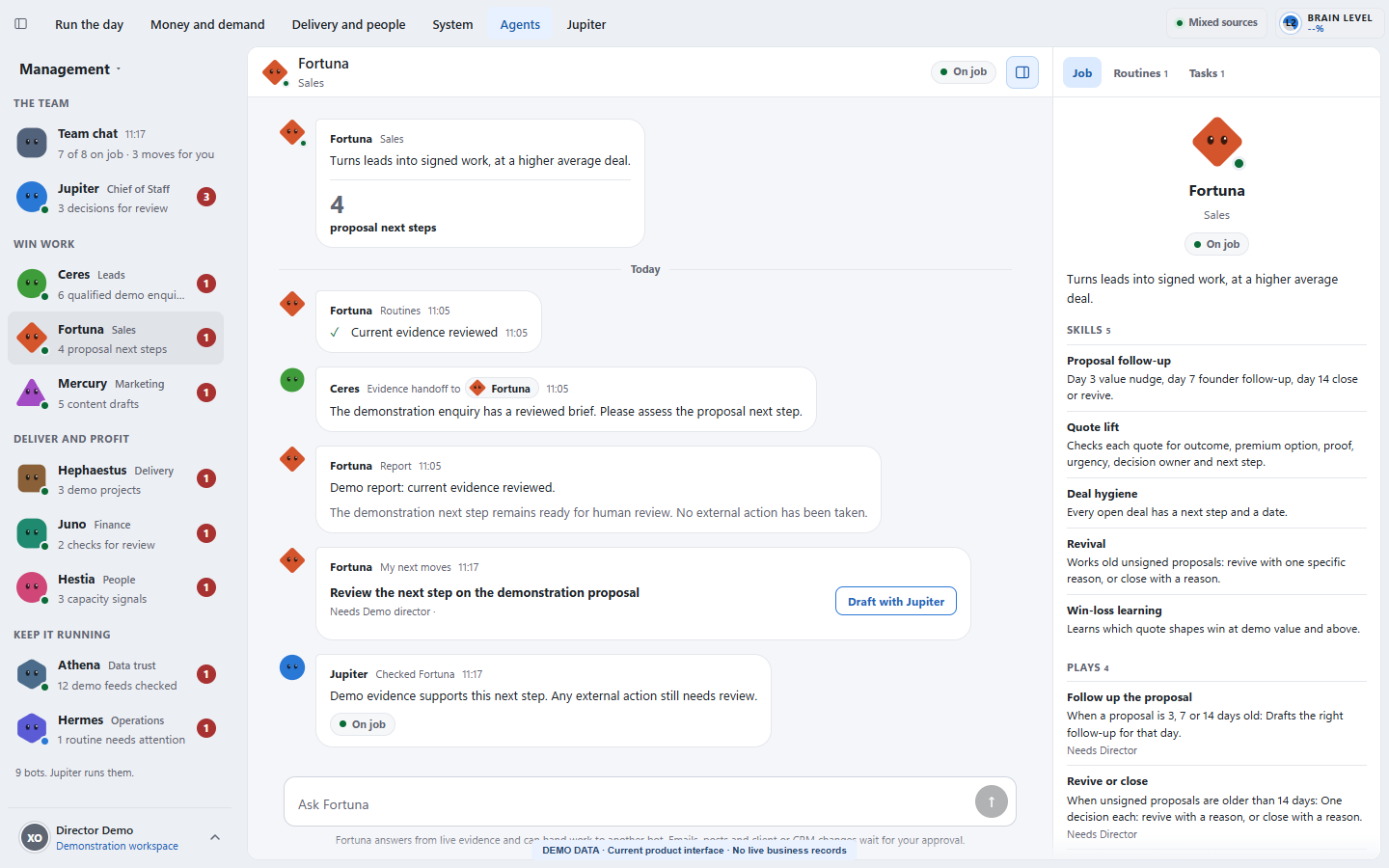
Nine specialists cover the chief-of-staff role, leads, sales, marketing, delivery, finance, people, data trust and operations. Team chat makes standups and handoffs visible; individual conversations show the work in context.
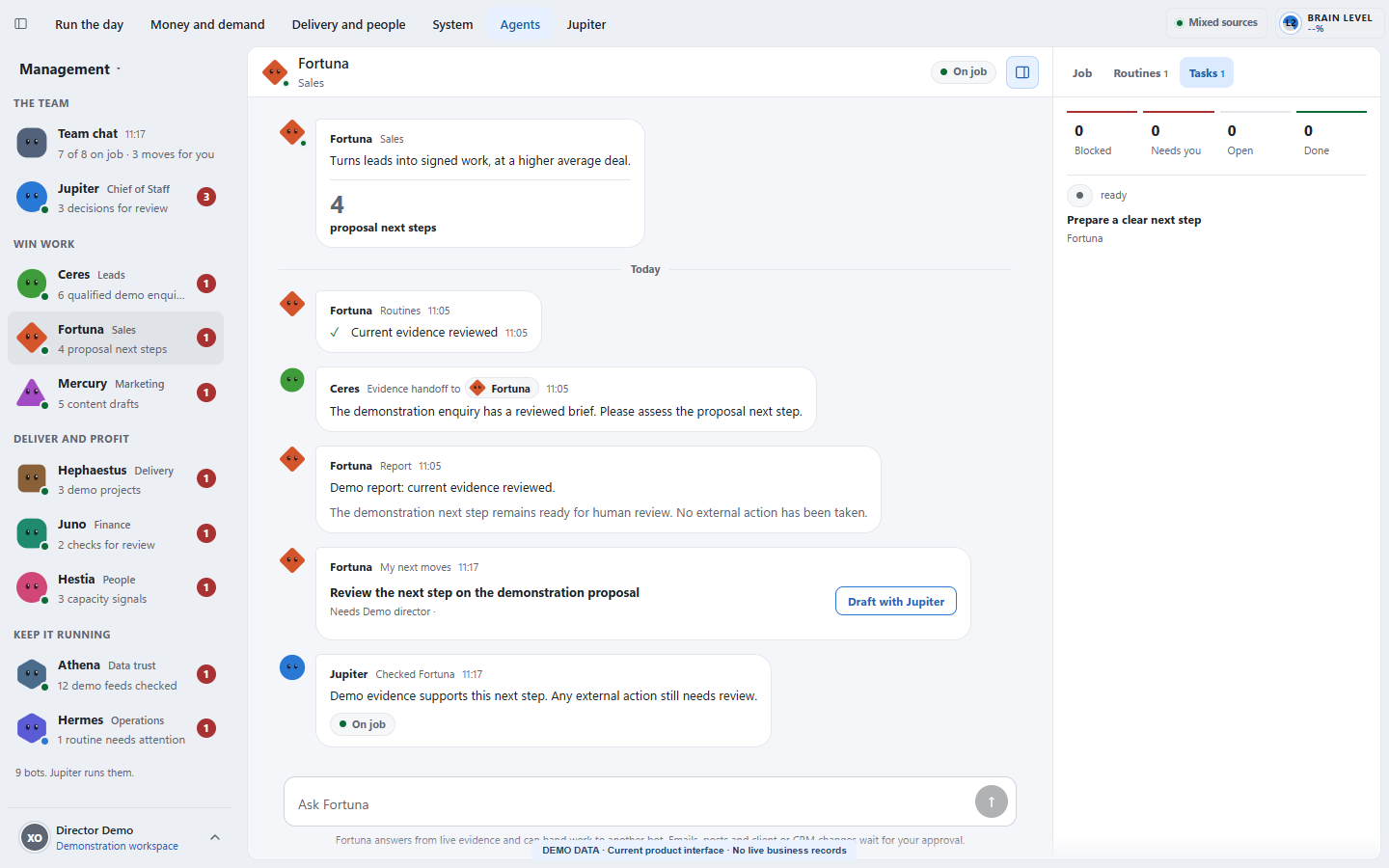
Job explains each responsibility and authority. Routines exposes recurring work and recorded runs. Tasks makes current work inspectable. Reports, next moves and checks sit beside the conversation.
A bot can be working, on job or in need of a fix. A fresh summary is useful only when the underlying result and source remain valid. The design keeps human review and role-specific action permission separate from a chat reply.
Intel is the website-intelligence area of the same application. Findings connect to the page, source evidence, scoring and limitations behind the summary.
Its role is to help a user decide which website issue deserves investigation or action. It keeps evidence and freshness visible rather than presenting a score as proof of a business result.
These are observed properties of the working system. They are not claimed percentages, revenue attribution or a guarantee of future performance.
Project boards, timelines and detail turn dates, owners, stages and blockers into inspectable work.
My Dashboard brings assigned projects, attention, dependencies, agents and planning into each person's permitted view.
Calendar requests, approved leave and Who's out help make availability visible during production planning.
Jupiter connects delivery questions to saved chats, structured cards and deliberate next actions.
Artist Tools puts established utilities, working local betas, calibration and development interfaces in the same discovery workflow.
Nine specialists make jobs, recurring work, tasks, reports and handoffs visible.
Each role has a defined responsibility, a shared conversation and inspectable work. These cards describe the job, not a guarantee that every agent is healthy or every action is available.
Connects team priorities and prepares decision briefs, inbox summaries and meeting support.
Action boundary
Coordinates within its assigned access; a recommendation or draft is not a completed external action.
Qualifies enquiries and prepares source-backed lead assessments and follow-up drafts.
Action boundary
Keeps qualification evidence and proposed follow-up separate from permission to contact a lead.
Reviews proposals, next steps and opportunities for follow-up.
Action boundary
Prepares sales recommendations within the role's authority; commercial decisions remain explicit.
Prepares case studies, content and marketing recommendations.
Action boundary
Drafting and publishing are separate steps; current permissions determine what can proceed.
Tracks deadlines, delivery scope and production checks.
Action boundary
Flags delivery issues and required checks; a status update does not prove a deliverable passed review.
Reviews cash, invoices and project profitability.
Action boundary
Uses permitted financial evidence and exposes missing or stale inputs.
Reviews workload, assignment and team capacity.
Action boundary
Works within permitted team information and keeps recommendations distinct from personnel decisions.
Checks whether recommendations use current, consistent and supported information.
Action boundary
Challenges evidence gaps rather than filling them with unsupported claims.
Coordinates routines, maintenance and limited recovery within its assigned authority.
Action boundary
Recovery is limited to the permitted work; faults and unavailable actions remain visible.
Every image preserves the interface purpose and control logic while replacing live people, projects, records and values with staged data.

Each entry links to the exact view it describes. Product captures and explanatory diagrams retain their own evidence labels.
The current Management interface connects the nine specialists, their work states and Jupiter's stand-up. All records and counts are fictional demonstration data.
Fortuna's current interface puts responsibilities, skills, handoffs and a source-linked conversation beside the work. The example reply remains a draft for review.
The task tab shows the next piece of work inside the same agent workspace. A fictional next step illustrates the current layout without claiming a client result.
Projects bring their delivery date, stage and next milestone into one production view. The three demonstration projects use fictional clients and staff.
The native timeline distinguishes saved dates from estimates and connects milestones to project ownership. The dates are synthetic planning examples.
A project opens into its current stage, final date, health, next action and separately dated delivery parts. Read-only limits stay visible in the current interface.
All eight internal Artist Tools have a named purpose and visible maturity. Video and whitebox are local beta tools; texture generation is beta, modelling is testing, Director Checker is calibration-only, Photoshop is a director pilot, and CAD Intelligence and Review remain in development. This catalogue is separate from the Labs registry.
The genuine browser interface exposes source, preset, framing and trim controls. This browser preview has no enabled processing target; the local native workflow is a separate execution route.
The beta control surface brings model input, camera and output presets together. This capture shows the actual unavailable browser target state, without claiming a completed render or installed material assignment.
My Dashboard brings assigned work, project stages, review, proposed focus time, email metadata and Jupiter into one view. All counts and records here are fictional; the calendar proposal has not been saved.
The genuine Calendar view brings approved and pending leave into the studio planning context. These fictional records illustrate the interface without claiming that any request was approved or written to Outlook.
A pinned Studio conversation connects a delivery question to project context and an explicit tool-opening choice. This demonstration opens no processing job and executes no external action.
The generation beta combines colour prompts, tiling inspection and aligned material-map preparation. This capture retains its unconnected service state and empty preview; no generated texture or successful export is claimed.
The current testing interface accepts a prompt or reference and model dimensions, then provides a place to inspect runs and outputs. The worker is unconnected in this preview, so no Blender scene or successful model is shown.
The calibration interface connects a brief, production stage, render and review annotations. AI analysis remains locked until the local model is approved and calibrated. The capture shows controls, not a quality-score result.
The director pilot exposes source input, edit intentions, presets and an inspectable plan. Its Photoshop worker is unavailable here. Other Adobe adapters remain future work; no completed PSD or export is claimed.
The visible dashboard is only the decision surface. Context, data, permissions, review and learning determine whether it can be trusted.
Management supports leadership decisions, Studio connects daily delivery, and Intel exposes website findings.
My Dashboard links a person's own work to exact project records, stage dates and delivery parts.
Calendar, leave visibility, files and version-specific feedback support production handoffs.
Saved conversations and nine specialist roles connect permitted evidence to a clear next step.
41 Labs definitions and eight internal entries expose utilities, local betas and development limits in context.
A useful workflow names the input, owner, check, approval boundary and proof that closes the loop.
Open the view for the decision: management exception, studio delivery or website finding.
Follow the project record, source evidence or specialist job behind the summary.
The responsible person or agent prepares the next task, recommendation or draft.
Review the proposed action against the role's authority and the evidence available.
Keep the result, unresolved issue and next owner visible in activity or conversation history.
Each feature exists because it changes a decision, reduces unsafe ambiguity or makes a failure easier to see.
Leadership uses a different view from the production team. Management organises the day around Run the day, Money and demand, Delivery and people, System, Agents and Jupiter.
Production combines project boards, planning timelines and a detailed project workspace. Users filter by person and project type, follow the current stage, and open the exact project from a card or their own dashboard.
My Dashboard brings Overview, Needs attention, My projects, Agents, Time blocking, Coming up, Email triage and Waiting on others into a person-specific workspace.
Production includes a Files and review workspace for browsing project files, versions, folder policy and connection state. Internal review and client feedback have different lanes.
The shared Calendar shows recorded leave and public holidays in a month view, with filters for person and entry type. Multi-day leave appears as a continuous bar across the relevant dates.
Jupiter is the conversational entry point into permitted company context. Saved chats, pinned conversations and visible history let users return to an ongoing question rather than starting again from a dashboard screenshot.
Artist Tools combines searchable categories, favourites and an Internal apps lane. The current catalogue defines 41 Labs utilities and guides, covering image preparation, textures, lighting, modelling, colour, planning, delivery and viewers.
Video Processing uses a source monitor, trim track, grouped output settings, latest-export panel and persistent processing bar. It provides three fixed MP4 presets: 1080p landscape, square and vertical.
The local Whitebox Rendering beta accepts common mesh formats, automatically frames the model, applies neutral white material and controlled studio lighting, then renders a transparent PNG.
The current tool is a calibration and annotation workspace for Grey Card, Material / Lighting and Post images. Reviewers pin issues to the render and choose from 36 fixed defect codes.
The material workbench combines colour generation or local image import with map preparation, border trimming, rotation and repeat previews.
The testing interface accepts a written brief, a reference image or both. Its intended bounded workflow plans geometry and materials, builds an editable scene, inspects rendered previews and attempts corrections.
The director pilot describes typed Photoshop edits with an immutable source, an editable PSD and a separate export.
The development entry describes a STEP-to-web-and-AR packaging pipeline with geometry checks, bounded repair, mesh optimisation and traceable quality evidence.
Nine specialists cover the chief-of-staff role, leads, sales, marketing, delivery, finance, people, data trust and operations. Team chat makes standups and handoffs visible; individual conversations show the work in context.
Intel is the website-intelligence area of the same application. Findings connect to the page, source evidence, scoring and limitations behind the summary.
The strongest evidence in an operating system is often the failure behaviour. These issues became design constraints and regression checks.
Management detail overwhelmed routine production work.
Shape each view around the decisions and information that role needs.
A team status alone did not explain the responsibility or work behind it.
Expose Job, Routines, Tasks and the shared conversation for each specialist.
An agent card could look complete while its underlying work was blocked or faulty.
Keep work states and failures visible, then inspect the actual result before treating it as complete.
A separate tool could lose the project and review context.
Place local video processing and whitebox rendering beta inside Artist Tools, with their limits visible.
Current screens contain confidential client, staff and commercial information.
Capture the genuine interface with a complete demo-data fixture and clear labels.
A public case study should make it easy to see what is working, what remains internal and what has not been proven.
Every visual is labelled as a direct public product capture or an actual product capture with generic data. This is evidence of design and operating capability, not a promise of rankings, revenue, leads, productivity or a client outcome.
Strategy, interface, governance and implementation are treated as one operating problem rather than separate deliverables.
Each link adds a different layer of first-hand evidence rather than repeating the same page under another keyword.
Practical answers about the build, its use and its limits.
An internal creative-studio application joining Management, Studio and Intel. Studio includes personal dashboards, Production, Artist Tools, Calendar and Jupiter.
Inspect assigned work, filter project boards, plan on timelines, open exact project detail, review stages and delivery parts, and follow owners, blockers and next actions. Editing follows the user's role and assignment.
It displays recorded leave and public holidays, accepts signed time-off requests and gives authorised reviewers a decision queue. Approved requests feed production leave visibility. It is not a complete Outlook replacement.
It brings saved conversations to permitted studio context, including delivery summaries, tool selection and editable request or draft cards. Access and action permission remain specifically limited.
No. Labs includes utilities and guides. Internal tools range from verified local video and whitebox betas to calibration, director pilots and development entries. Each tool's status is stated separately.
No. Artists and senior reviewers still judge the output. A prepared card, draft or recommendation is separate from the authority to execute or release it.
A working product and inspectable workflows, with exact maturity limits. No independently measured productivity gain or attributed revenue result is claimed.
Review one studio delivery workflow. Handover: a role and decision map, shared project model, critical planning and review flows, tool maturity inventory and prioritised pilot brief. Scope and schedule are agreed after the fit conversation.
Thomas maps the operating decisions, designs the shared project model and shapes the views, specialist roles and review workflow around the work.