Current capability
Shared conversations, Bots navigation, supporting details, recorded activity and in-chat review cards.
The Personal OS app brings the same work, conversations and review decisions into a focused application experience. Desktop chats, supporting Details and exact review cards sit inside a Rust and Tauri app. Responsive layouts, notification handoff and recovery have clear roles; Android and Wear OS retain their separately dated evidence and availability limits.
Read the result, source and limits together.
Shared conversations, Bots navigation, supporting details, recorded activity and in-chat review cards.
The genuine current desktop and responsive interface with fictional records and review choices.
Product strategy, design and application build, including the shared decision model and native review experience.
Current desktop captures do not establish a new phone or wearable release. Suggested replies, local review and external execution remain separate.
Inspect the application surfaces and device evidence
Each screen should expose the decisions it can support well. Shared conversations and evidence can retain continuity, while native actions, source availability and recovery remain specific to the application route.
A direct account of the operating constraint, the product decision and the limits of the evidence.
A desktop supports detailed review and a conversation beside its supporting evidence. A phone prioritises a readable task and deliberate touch controls. A watch serves narrower device tasks. The application work needed continuity without assuming those screens should expose the same density or authority.
Thomas designed and built a shared decision interface with focused application routes, specialist conversations and supporting Details. Native desktop work adds exact review, window behaviour and notifications; responsive layouts preserve clear choices and readable cards when space is limited.
Reliability is part of that product experience. Loading, connection failures, pending changes and source freshness each have their own meaning. The case distinguishes the current shared interface from installed desktop proof and earlier phone or watch proof, so a new screenshot does not imply a fresh release everywhere.
| Current interface | Hermes, Bots, persistent chats, Details and exact review cards use the genuine shared renderer. |
|---|---|
| Desktop estate | Rust and Tauri, with dated installed review, notification and recovery evidence. |
| Responsive design | Narrow layouts preserve readable cards and deliberate controls; a browser viewport is not an installed phone release. |
| Decision semantics | Prepared reply, local review, exact email send and later external result are different actions. |
| Device evidence | Earlier Android, foldable and Wear OS records are described separately from current desktop evidence. |
| Demonstration limits | Fictional Demo data, absent native action bridges and refused mutations in the public capture preview. |
Follow the work through its tools, people, evidence and decisions.
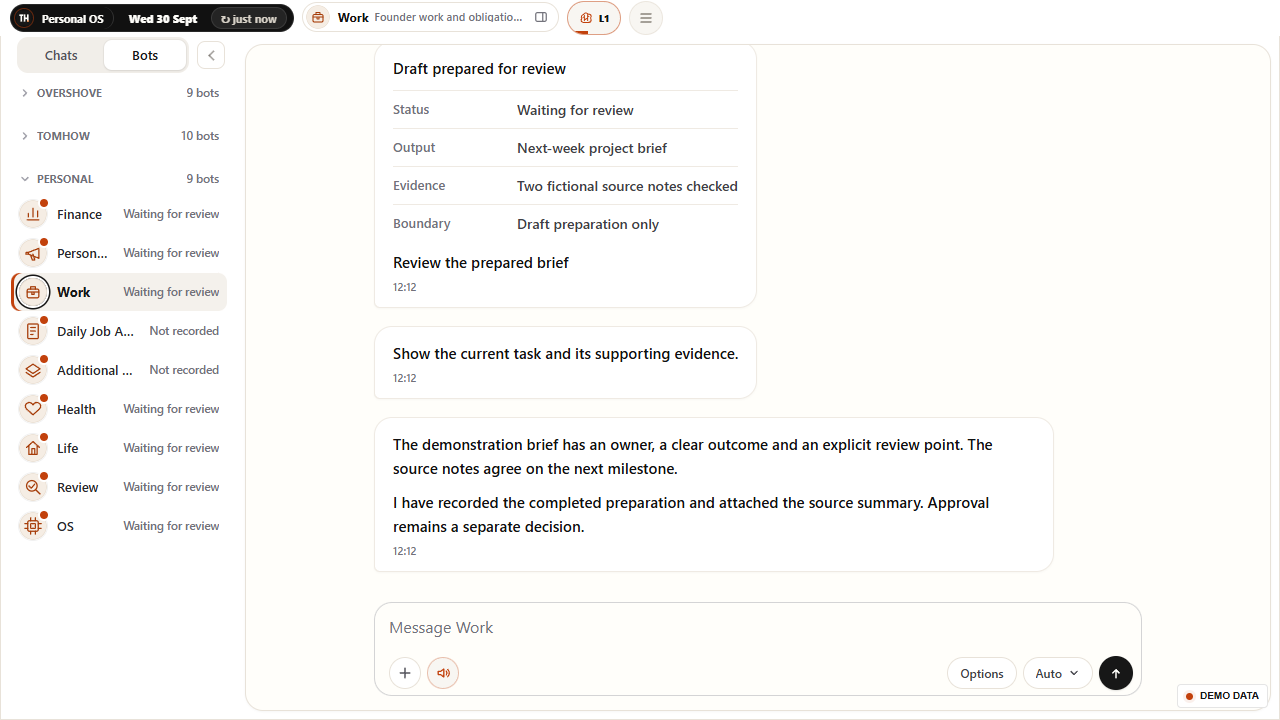
The desktop application uses Rust and Tauri around the shared Personal OS interface. Hermes offers the main conversation entry, while Bots opens specialists and their ongoing chats. The current Agents button returns to Bots, keeping agent navigation distinct from the Hermes chat list. A wide conversation can keep its Details panel open alongside the messages.
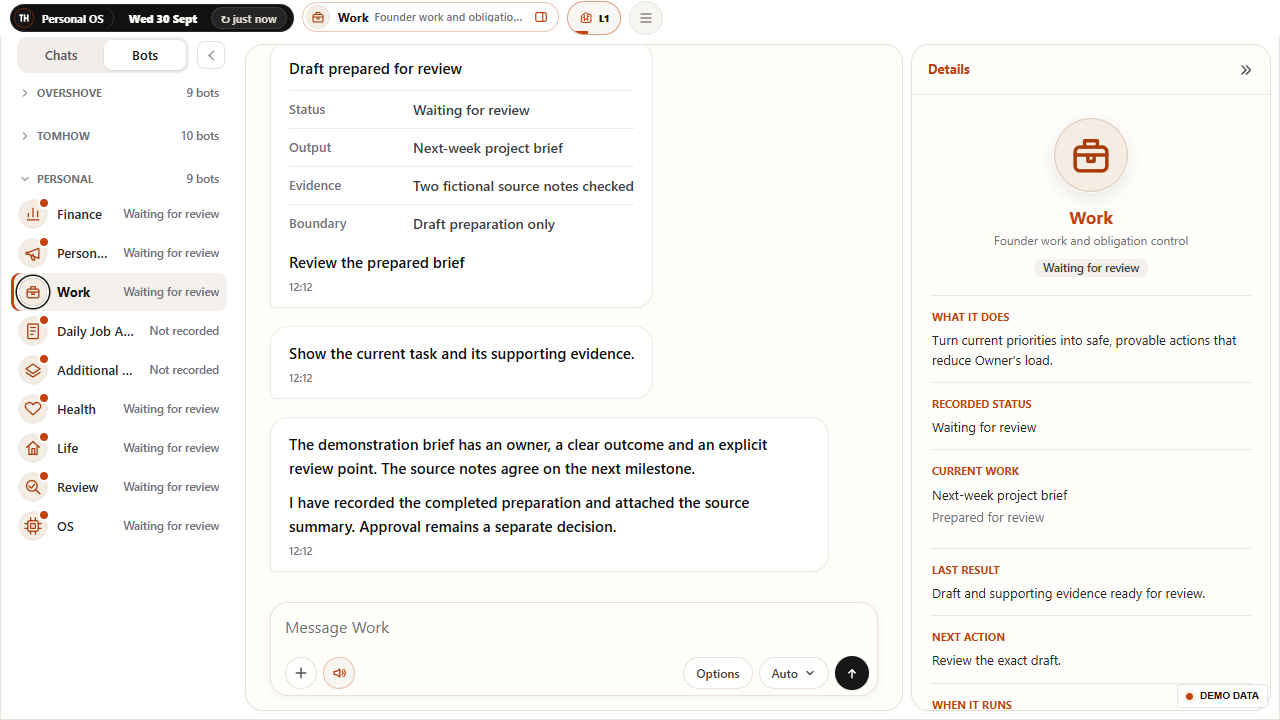
Details gives the operator current work, last result, blockers and recent recorded runs without repeating those facts in every chat message. The public refresh demonstrates this genuine renderer with fictional records. Browser captures establish the shared interface and responsive behaviour; they are not photographs of a native device or proof that a native action ran.
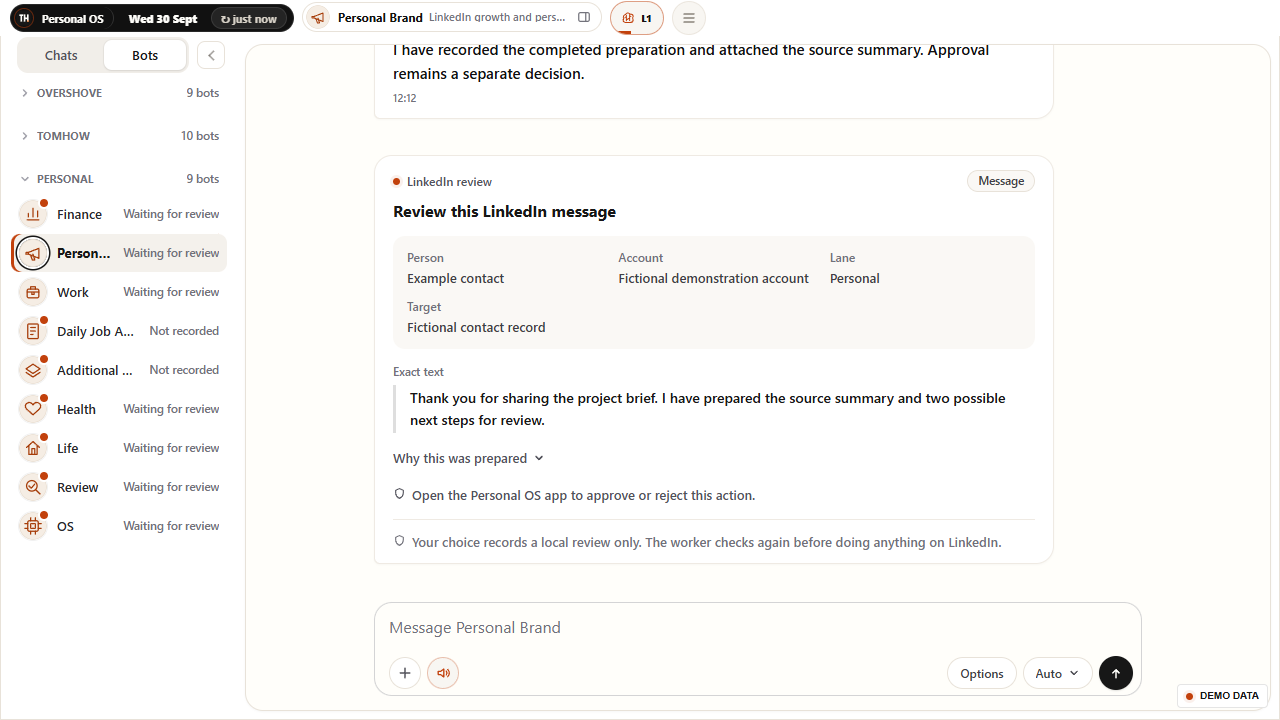
Personal Brand's LinkedIn proposals appear as complete cards inside its chat. The card identifies the account, lane, person or target, action kind, context and exact text. An eligible trusted desktop click records approval or rejection against that specific version and reports progress or refusal inline. It does not create permission for a later post, invitation or message.
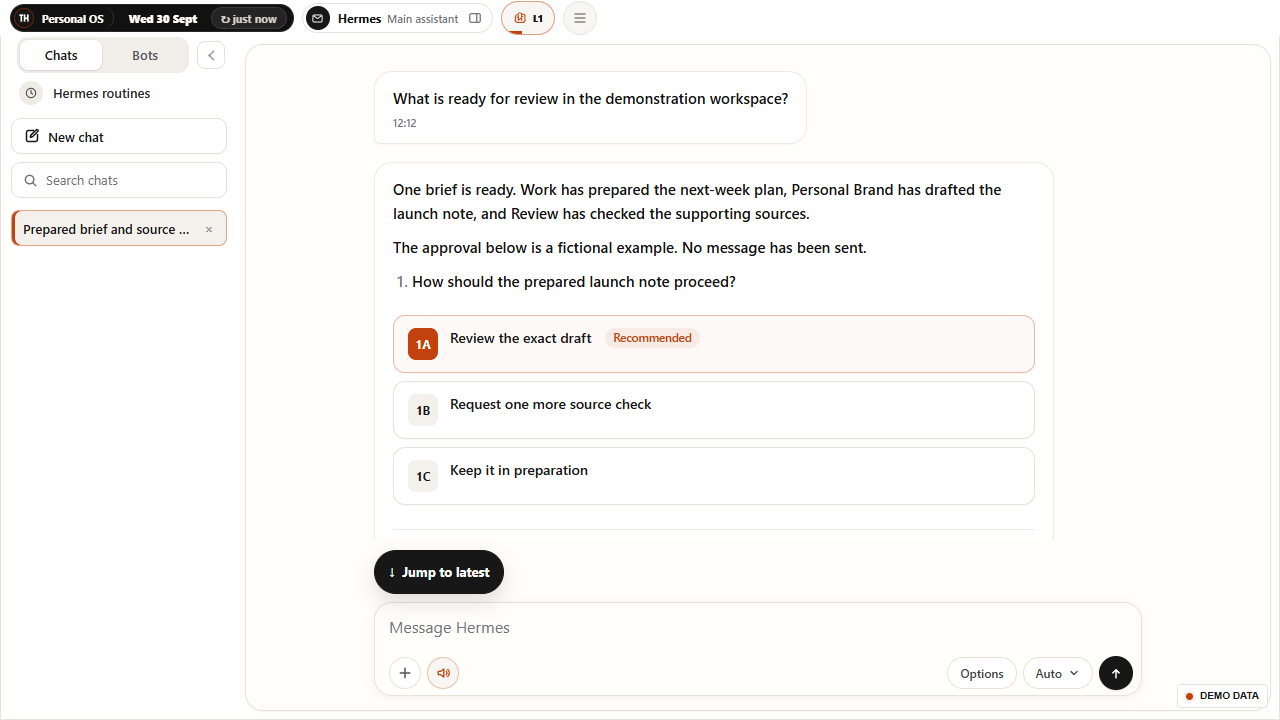
Email review follows its own contract: Review > Email opens the complete packet, and Approve and send is an exact send action rather than a generic local review. Suggested multiple-choice replies have a third behaviour: they fill and focus the composer without sending. Clear copy and separate controls help the user understand which of these decisions is being made.
The desktop has an app-owned approval popup with the TH mark, review type, headline and two deliberate controls: Dismiss and Open review. It keeps a short lifetime and a quiet baseline for items already pending at startup. Opening an alert returns to its exact review destination without approving or sending the item.
The popup and main application are designed to remain responsive during that handoff. A reported freeze was reproduced, repaired and checked with a preview alert opening review while the application stayed responsive. The current evidence supports the installed popup behaviour and preview handoff. It does not establish every future real alert's wording or resolved-item clearing on every device.
Narrow chat layouts prioritise readable cards, full-width touch actions and intentional navigation between Bots, the conversation and Details. Choice controls support click and keyboard interaction; the current approval polish uses a readable type floor, large phone actions and reduced-motion support. The shared design adapts its information density instead of squeezing the desktop arrangement into the same row.
The native Android estate includes signed builds, physical-device installation evidence and earlier foldable checks. Launcher routing, background concealment and recovery have been tested through that work. The latest responsive screenshots show the current shared interface at a narrow viewport. Phone updates are held during device repair, so these images do not announce a fresh installed Android release.
The applications use a common decision model while treating connection and rendering failures as part of the experience. Desktop loading waits for the ready interface rather than immediately presenting a blank page. Retry and recovery surfaces give the user a route back when a document or connection fails. An unavailable source should remain a limitation in the content after the application loads.
Shared daily state has its own acknowledgement and recovery behaviour. Earlier phone repairs demonstrated preserved pending changes reaching the host after access recovered, without resetting app data. Successful loading, a healthy connection and an acknowledged change are different facts. They are checked separately so a ready-looking screen does not silently claim every write or source is current.
The Android and Wear OS estate includes health-input work alongside the decision workspace. Earlier evidence covers signed phone and watch builds, read-only health-provider integrations and device-specific sensor permissions. Health uses available measurements as dated evidence for planning, while meal preferences, recipe candidates and shopping preparation have their own local sources.
An installed watch build does not prove a fresh sensor session, and a phone health integration does not prove complete provider history. The current phone is in repair and wider Health inputs can be stale. This case retains that distinction: the working meal-planning cache is described separately from phone or wearable availability, and no diagnostic or continuous-monitoring claim is made.
Evidence is organised around the behaviour being claimed. A browser check can establish layout, navigation, choice handling and the shared chat renderer. An installed desktop check can establish native window or review behaviour. A signed build establishes an artifact; a physical-device check is needed to establish its installed behaviour. These forms of evidence complement one another.
The public records are fictional and labelled Demo data. Native action bridges are absent from the screenshot preview, and all mutations are refused. The refresh therefore shows current interface quality and explains evidenced product capabilities without exposing private source records or performing a real approval, send, purchase or application. It claims no measured time saving or universal agent autonomy.
These are observed properties of the working system. They are not claimed percentages, revenue attribution or a guarantee of future performance.
Hermes and named specialist roles open persistent conversations with current work and supporting details.
Approval cards place facts and exact text beside the conversation that needs the decision.
A suggestion fills the message box, while sending and protected review actions remain separate.
Recorded runs, last results and limitations are available without making every routine check a new chat message.
The estate preserves different information needs for desktop, phone, foldable and wearable surfaces.
Current desktop evidence and earlier device evidence stay distinct; source or connection failures remain visible.
Hermes and nine featured specialists share the operating model described in the Personal OS case. Bots opens the ongoing conversation; Details explains the recorded work and its limits. Native actions depend on the available application route.
Connects permitted context across the workspace, answers grounded questions and prepares a clear decision brief. It routes the user into the appropriate ongoing specialist conversation and helps keep ownership visible. Its oversight can surface relevant recorded outcomes and sustained source problems without making every background check another message.
Action boundary
An answer, model selection or oversight update does not prove that a separate task executed.
Connects current priorities, inbox obligations, calendar context and founder administration. It maintains the goal-to-action preparation behind the work view and gives the user a route to the evidence and next decision. Its Details panel distinguishes current tasks, latest results, blockers and recorded runs.
Action boundary
Preparation is separate from confirmed execution; sends and other consequential actions use their own review.
Prepares source-backed posts, infographics, carousels and companion copy within the personal brand system. It also prepares qualified LinkedIn growth actions with the account, target and exact wording visible in chat. LinkedIn Growth opens this existing specialist conversation, while Details exposes dated work and current access limits.
Action boundary
Local review is separate from publication or outreach; a live browser picture is not available.
Checks suitable ordinary jobs and contracts, prepares evidence-led application material and advances specifically authorised initial applications. Its separate report records provider-confirmed receipts and current failures. Hermes oversight can surface suitable confirmed applications and the exact run result without presenting a local draft as a submitted application.
Action boundary
Defined suitability and daily limits apply. Recruiter replies, interviews, offers and assessments remain separate decisions.
Maintains a separate workflow for service opportunities and selected income platforms. It checks eligibility, prepares next steps and records the difference between local work, a confirmed initial application and a real financial outcome. Routine zero-result checks stay in reports and Details so they do not crowd the conversation.
Action boundary
Only specifically authorised free initial applications may proceed; new terms, payments, contracts and personal checks remain separate.
Uses permitted current finance evidence to support budgets, savings, runway and financial control points. Recurring work can maintain a planning or money-move pack, while source dates and missing inputs stay visible. Its chat supports questions about that evidence rather than implying that a polished card makes every input current.
Action boundary
Does not transact. Stale evidence can block a specific review even when the conversation is available.
Supports non-diagnostic planning for meals, training, sleep, recovery and energy. Meal planning combines individual feedback, checked whole-pack stock, candidate recipes and served history. A weekly local meal mission has its own proof, allowing food planning to remain separate from the freshness of phone and wearable inputs.
Action boundary
No diagnosis or automatic purchase. Current device data and complete provider coverage are not assumed.
Organises household plans, travel and personal obligations. The latest local preparation increment separates work owed by the owner, other people's commitments, verification holds and history, then ranks preparation packets with explicit closure evidence. It keeps incomplete assets and missing source coverage visible instead of promoting a template to a finished task.
Action boundary
The first preparation increment is live; full drafting, executed administration and proved real closures remain later work.
Checks whether controller outcomes match their supporting evidence. It distinguishes a genuine changed asset, a verified unchanged result and a proved blocker, and challenges unsupported success or stale state. This gives the system a completion check beyond the agent that prepared the work.
Action boundary
Judges the result; it does not execute the work it is evaluating.
Tracks source truth, reliability, recovery and safe improvement proposals. It maintains recorded control information and cost evidence, helping the user distinguish a source problem from completed work. Its role supports the existing specialist estate rather than creating another chief-of-staff identity.
Action boundary
Reports and limited recovery do not imply unrestricted system changes or guaranteed availability.
Every image preserves the interface purpose and control logic while replacing live people, projects, records and values with staged data.
Each entry links to the exact view it describes. Product captures and explanatory diagrams retain their own evidence labels.
The desktop application uses this shared conversation interface. This capture comes from its current browser renderer with fictional records; native device execution is not exercised. Simple role icons replace the portrait placeholders in this demonstration capture.
The current details surface exposes the role, dated work and next action. It separates prepared output from a completed external outcome.
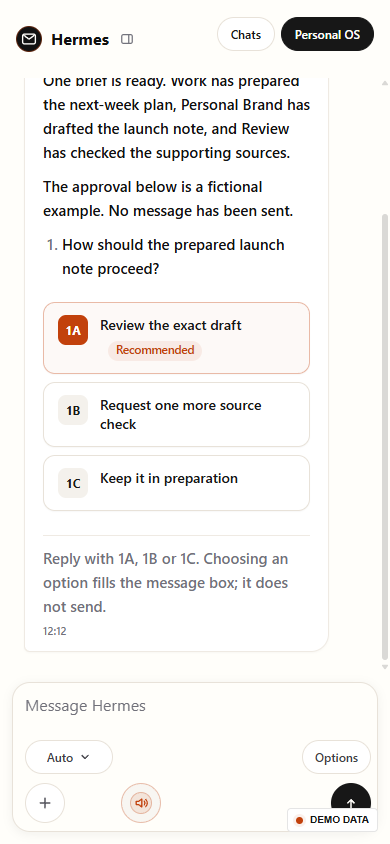
Hermes gathers the fictional preparation into one response with clear suggested choices. The real interface fills the composer when a choice is selected.
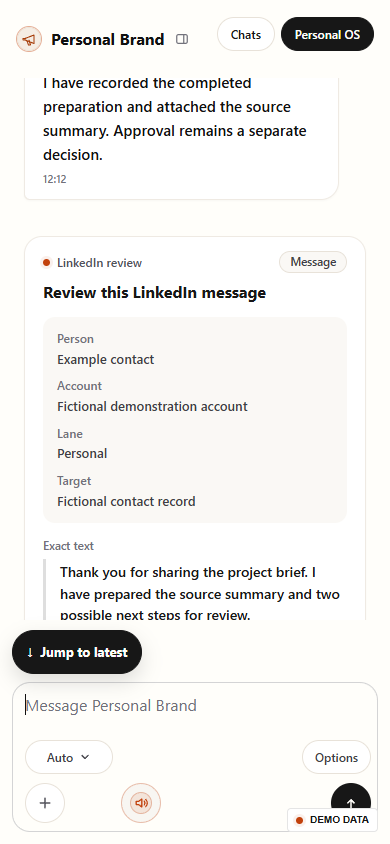
The shared review card makes the proposed message inspectable. Native approval remains separate; no approval or external action is enabled in this browser fixture.
The current shared renderer is readable at a phone-sized breakpoint. This demonstrates responsive layout, not feature parity across desktop, Android and Wear OS.
The exact action remains readable on a narrow screen. Existing mobile builds retain their separate verification and release states.
The visible dashboard is only the decision surface. Context, data, permissions, review and learning determine whether it can be trusted.
The workspace keeps the same concepts for work, proposed actions, review and recorded results. Persistent conversations preserve context while each application surface exposes the detail appropriate to its screen.
Rust and Tauri supply the current desktop application estate, native window behaviour and eligible review controls around the shared interface. Browser rendering proves the UI separately from native execution.
LinkedIn local review, email Approve and send and suggested-response selection have distinct controls. Alerts return to the exact work item without making the decision for the owner.
Wide layouts can show supporting Details beside the conversation. Narrow layouts give readable cards and touch controls room, with intentional navigation into the evidence.
Loading readiness, acknowledged state changes, connection recovery and source health remain separate checks. An apparently ready window does not establish that every source or write is current.
Signed builds and earlier physical-device checks support the broader estate. Current phone updates are held and fresh wearable measurements remain unproved.
Fictional records preserve the genuine current renderer. The screenshot preview has no native action bridge and refuses mutations, protecting private data and avoiding real effects.
A useful workflow names the input, owner, check, approval boundary and proof that closes the loop.
Use the application surface appropriate to the work and available device.
Choose Hermes or a specialist role, then open the same ongoing conversation.
Read current work, supporting facts, recorded activity and limitations.
Prepare a response or use an available protected review control for the exact proposal.
Check the resulting state and evidence; recover explicitly when a connection or source is unavailable.
Each feature exists because it changes a decision, reduces unsafe ambiguity or makes a failure easier to see.
The main conversation entry and specialist list lead into persistent chats rather than creating fragmented copies.
Current work, latest results, blockers and recent recorded runs remain one step from the messages.
Account, lane, target, context and complete text explain the proposal being reviewed.
Suggested replies prepare text, native LinkedIn review records a local decision, and exact email review governs sending.
An app-owned popup offers Dismiss or Open review and returns to the work without approving it.
Readable review cards, large touch actions, keyboard choices and reduced-motion support shape the narrow interface.
Deliberate ready-state, retry and recovery surfaces address blank pages, connection failures and interrupted handoffs.
Pending daily changes remain separate from confirmed host acknowledgement and source freshness.
Existing signed builds and earlier physical-device checks support device-specific behaviour without a fresh-release claim.
Earlier build and installation evidence is retained separately from current sensor freshness or complete provider history.
The strongest evidence in an operating system is often the failure behaviour. These issues became design constraints and regression checks.
Dense desktop panels do not provide a useful phone or watch experience.
Shape each application surface around the decision its screen and context can support.
Opening a specialist could otherwise create fragmented conversations.
Use shared chats and role details for consistent navigation and recorded work.
A suggestion, a review click and a send can be mistaken for the same action.
Separate prepared text, protected desktop review and any later external execution.
Routine checks could overwhelm the conversation.
Keep unchanged checks in reports and history while relevant changes remain visible.
A new desktop view could be mistaken for a release on every device.
Describe device evidence and limits separately, without claiming feature parity or continuous connectivity.
A public case study should make it easy to see what is working, what remains internal and what has not been proven.
The visuals show working private application surfaces with demonstration data. They do not expose private device records or prove a public user outcome.
Strategy, interface, governance and implementation are treated as one operating problem rather than separate deliverables.
Each link adds a different layer of first-hand evidence rather than repeating the same page under another keyword.
Practical answers about the build, its use and its limits.
Yes. The estate includes a Rust and Tauri desktop application with dated installed behaviour evidence. The current public images render the genuine shared interface in a browser with fictional data; they do not prove a native action ran.
The selected code fills and focuses the message box. It does not send a message, approve a proposal or trigger an external action.
No. A desktop alert opens the exact review destination. The owner reads and decides there; Dismiss closes the notification without rejecting the underlying proposal.
LinkedIn review records the exact local decision and leaves later execution checks separate. Review > Email uses its own exact Approve and send contract. Each control should clearly explain the action it performs.
That is not established. Current shared-interface checks and earlier signed-build or physical-device evidence are separate. Phone updates are held during repair, and fresh wearable measurements are unproved.
Earlier phone repairs demonstrated preserved pending state reaching the host after access recovered. Loading, connectivity, acknowledged changes and fresh source data remain distinct checks.
A working application design and evidenced behaviours with clear device and action limits. It does not claim universal autonomy, continuous connectivity, complete health coverage or a measured time saving.
Review one cross-device workflow. Handover: the shared state model, critical conversation and review flows, device boundaries and an evidence-backed pilot brief. Scope and schedule are agreed after the fit conversation.
Thomas can shape a private workflow into a focused application estate with shared conversations, readable evidence, recovery and clear review controls.